Web App
Streamlining Unified Workflow, Communication & Documentation Gap
Project Brief
Built to replace scattered tools, this single hub unifies communication and task execution. It features a searchable knowledge base, a dedicated forum, and a streamlined task manager with quick single-panel creation and editing. With less context-switching, improved pipeline visibility, and an increase in accountability, ensuring broken threads are resolved and team collaboration is instantly faster and clearer.

Contribution
Company
OutSpun Client
Timeline
1 months
Role
Product Designer
Work I did
Research
UX Improvement
Flow Simplification
IA Simplification
Team
1 UI/UX Designer
1 Product Manager
1 Fullstack Developer
About the Product
Innoscripta is an all-in-one workspace designed to unify communication, documentation, and task management. It replaces fragmented tools with a single intuitive hub where teams can collaborate, track progress, and share knowledge seamlessly. With features like focused discussions, a searchable knowledge base, and streamlined task creation, it eliminates workflow friction. Innoscripta enhances clarity, accountability, and speed—empowering teams to work smarter and stay aligned across every project.
Research Insights
User Thoughts
It was found there was lapse in communication across departments as various teams use various third-party platforms(Slack, Notion), causing inefficiency.
There was difficulty in tracking tasks and synchronizing pipelines across multiple platforms creating challenges for teams and managers to manage task.
Due to hectic task assignment and pipeline management managers must switch between apps to stay updated with progress and team.
Unnecessary redundancy and friction was present in task creation and updates through multi-step process leading to inefficiency and errors.
Pain Points
Communication Thread Broken
Teams are using multiple, and separate platforms, causing a lack of cohesion and confusion.
Inconsistent Task Tracking
With no unified system, it's difficult for teams and managers to stay aligned on project progress.
Time-consuming task management
Managers have to hustle and thus lose time switching between different apps just to assign tasks and track pipelines.
Complex task workflows
Multi-step processes for task creation and updates lead to unnecessary friction in process, increasing the potential for errors and inefficiencies.
The Problem Statement
Need of a single platform for unified communication and task management provides real-time visibility, eliminating workflow friction and boosting team productivity.
Design Solution
Defining Tasks
Task 1
Unified Communication Platform Design

Objective
Create an integrated communication system that consolidates messaging, file sharing, and collaboration tools into one platform.
Goal
Eliminate the use of multiple third-party platforms to improve communication across departments, ensuring real-time updates and seamless interaction.
Task 2
Task and Pipeline Synchronization System
Objective
Develop a centralized task management tool that integrates with existing systems to track, assign, and update tasks in a streamlined, single platform.
Goal
Simplify task assignment, update processes, and reduce redundancy by providing managers and teams with real-time access to project pipelines, minimizing the need for switching between apps.
TASk Flow - 1
Unified Communication Platform Design
User Flow
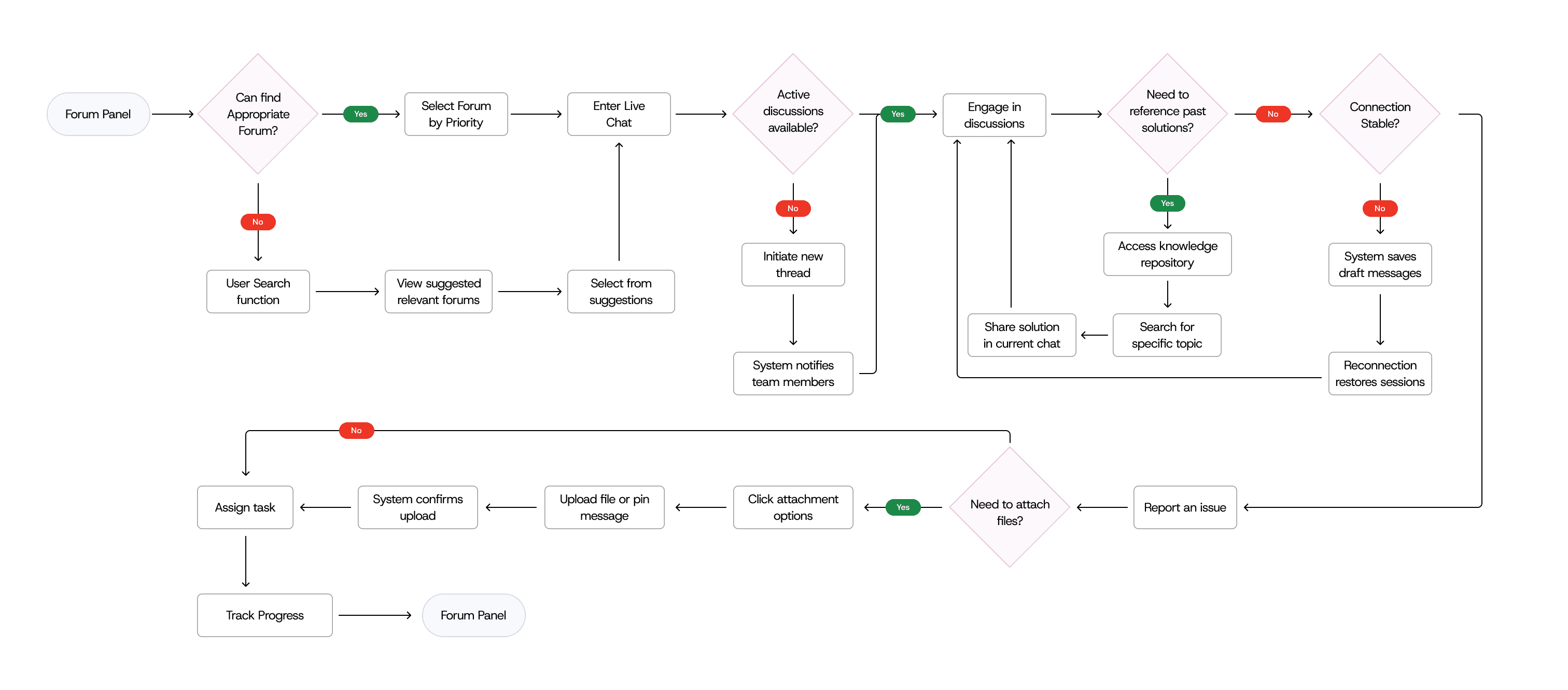
Interview Scheduling and Confirmation Flow
By centralizing communication and error reporting within the platform’s built-in forum, teams efficiently streamlined their workflow and improve collaboration. This ensured all relevant information is stored in a single, accessible location.
The forum also acts as a searchable knowledge repository, allowing teams to track progress, assign ownership, and resolve issues more efficiently.
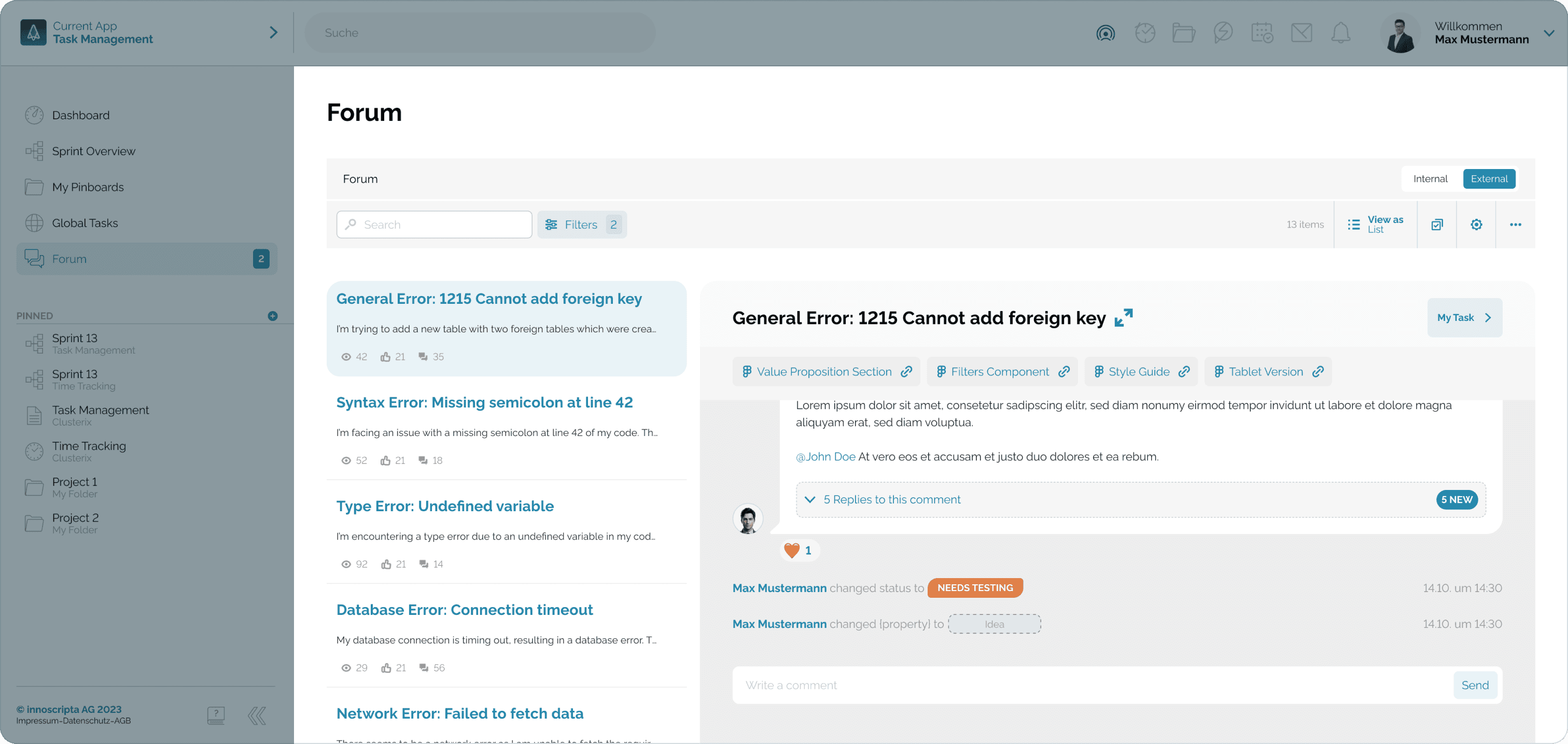
Focused Knowledge Base for Faster Resolution
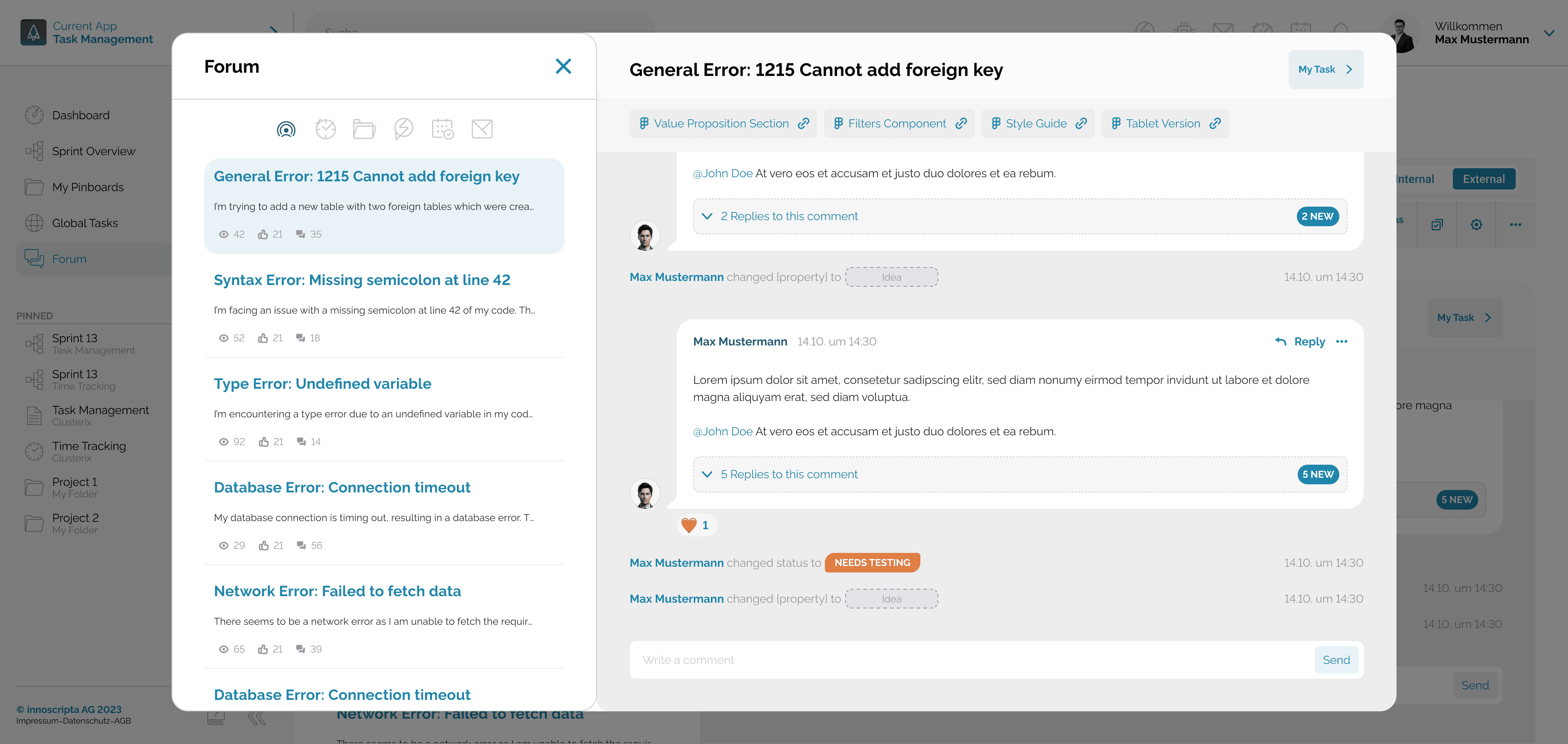
The modal provides direct communication by creating a focused discussion panel.
Prevents conversations from getting lost in a general chat, ensuring all comments, status changes, and file attachments are directly tied to the problem.
Keeping all relevant information in one place, the team can quickly resolve issues without external distractions, making the resolution process more efficient.
TASK Flow - 2
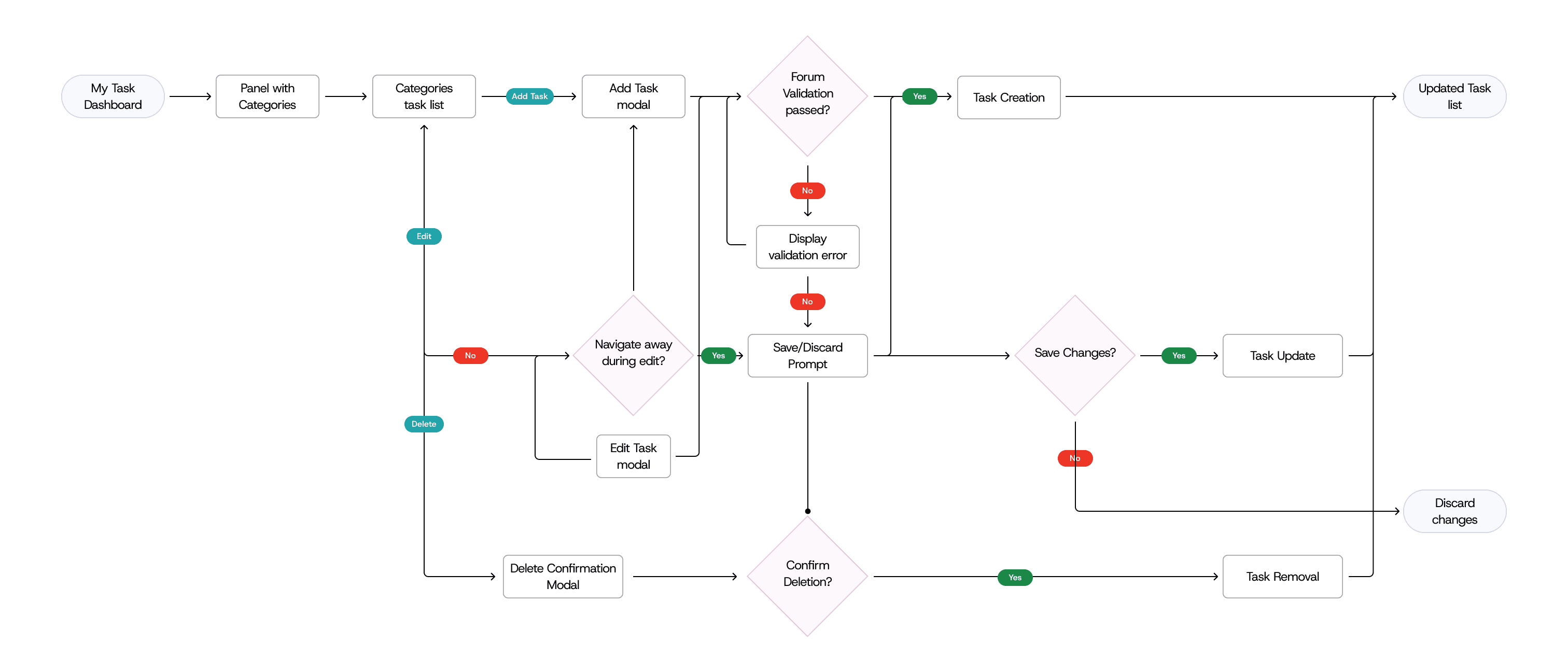
Task Management
User Flow
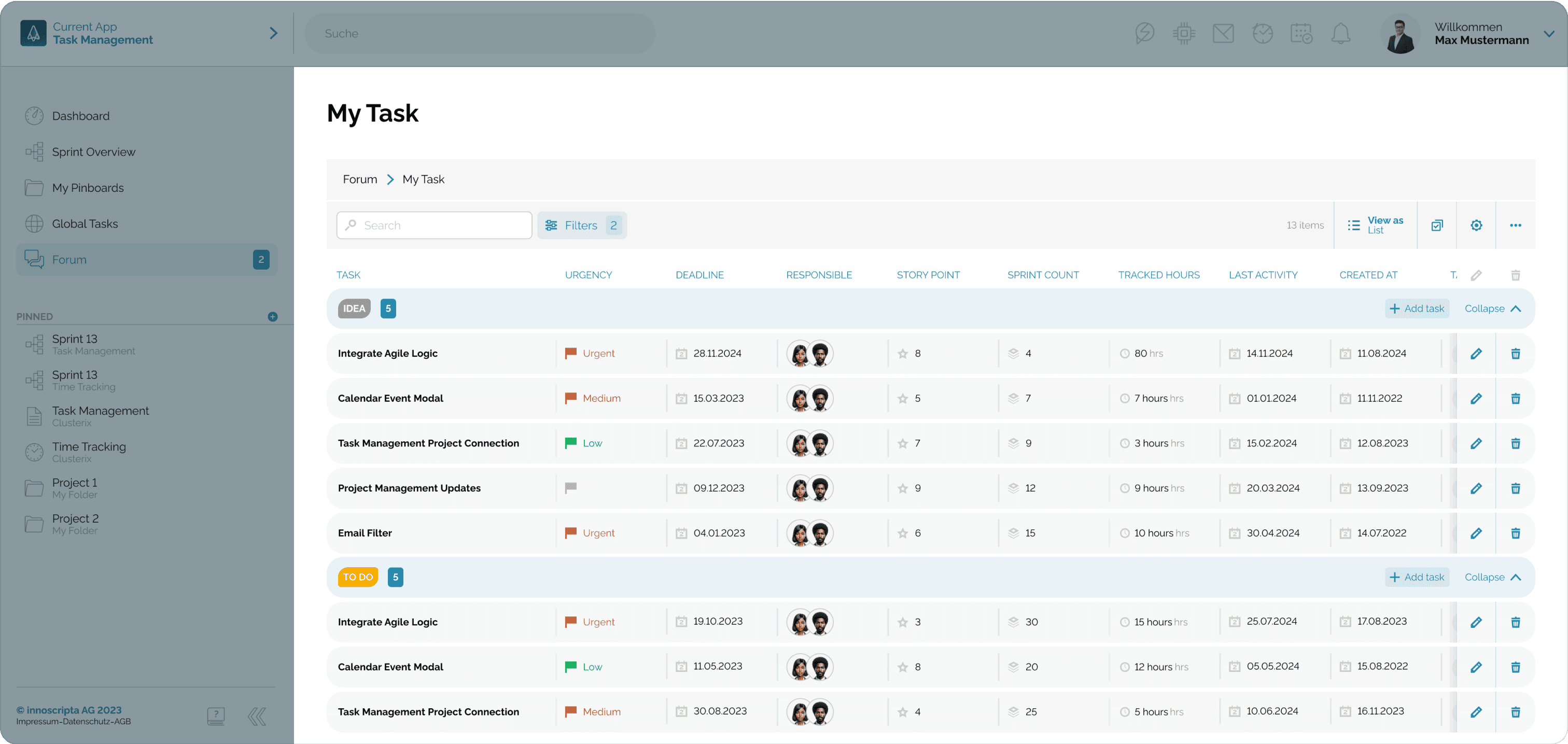
Allotted Task Listing
The system offers a centralized solution for managing allotted tasks by providing a comprehensive, filterable list within a specific forum module. This feature allows users to see all their assigned tasks in one place, complete with key details.
Consolidating task information and its related discussions, the platform ensures that project management and problem solving are contained within a single, efficient environment.
Direct approach streamlines workflows and ensures clarity on progress and accountability.
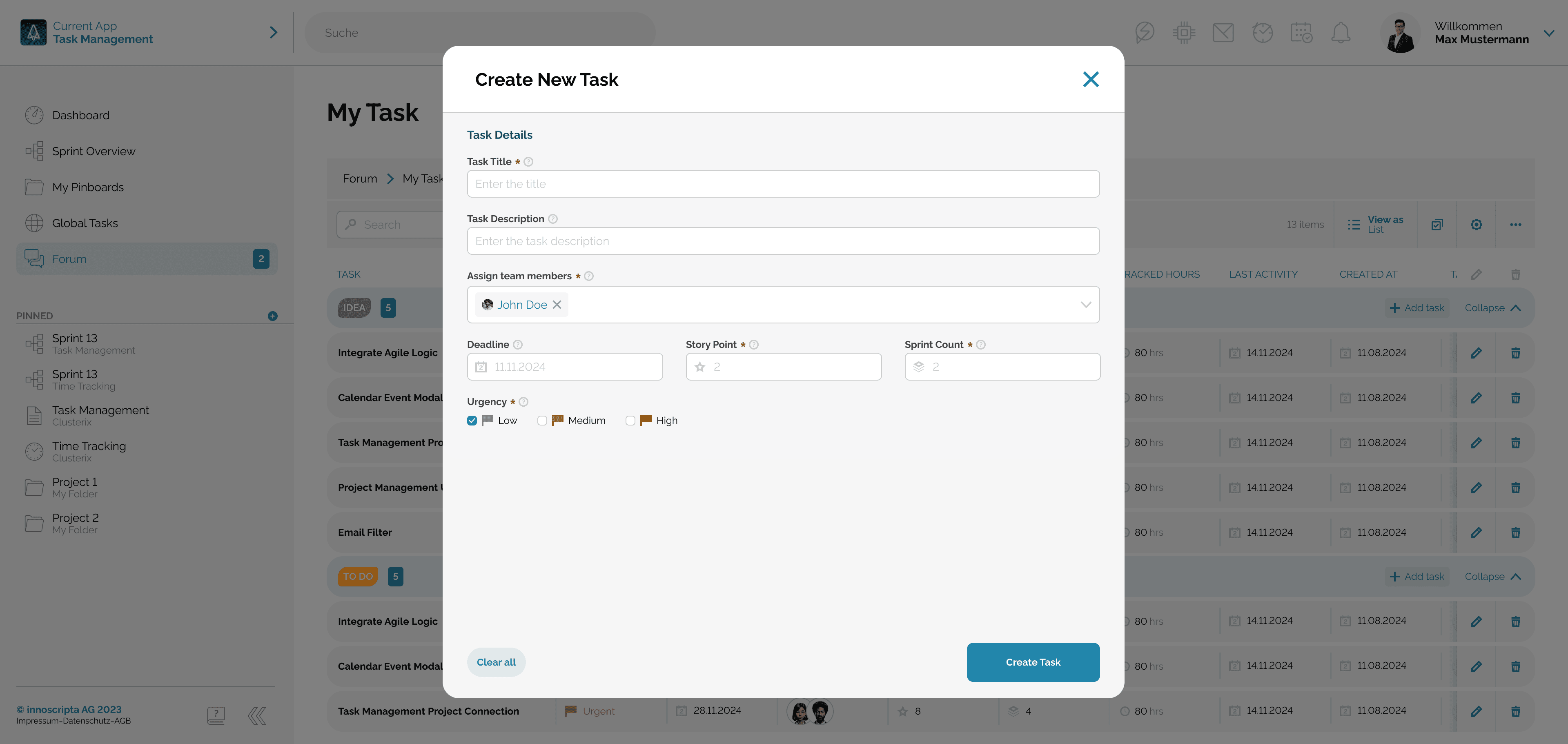
Simplified Task Creation Interface
The modal provides a structured and focused approach to task creation with all essential fields are available in a single, intuitive panel.
New design eliminates redundancy and streamlines the workflow, ensuring all critical details are captured upfront and promoting immediate team alignment and accountability.
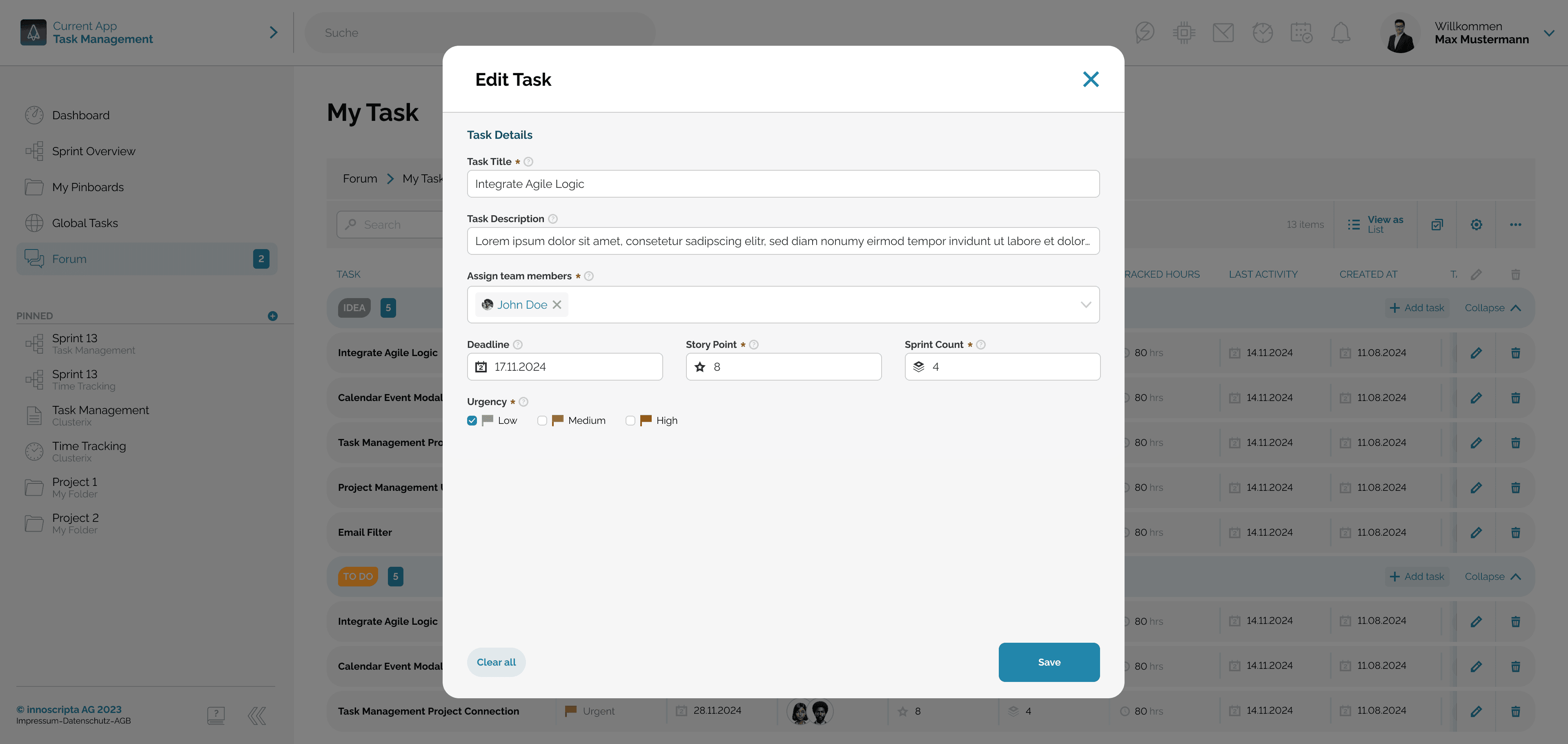
Streamlined Task Editing
The Edit Task modal offers a flexible and efficient solution for managing ongoing tasks.
By presenting all editable fields on a single panel, it allows users to quickly modify a task's details, such as deadlines, assigned members, and urgency, without navigating multiple steps.
Direct approach makes the task management process more fluid and adaptable to evolving project needs while ensuring all changes are transparent and easily tracked by the entire team.
Key Takeaways & Learnings
Importance of Centralized Information
From a design standpoint, ensuring that all communication, task updates, and file attachments are housed within a single platform minimizes user friction. Centralization makes it easier to design intuitive interfaces where users can quickly access all relevant information without feeling overwhelmed by multiple systems.
Focused Communication Reduces Distractions
Direct communication and task management is a critical design choice. By focusing conversations and updates within these modals, designers can create a clean, distraction-free environment. This approach reduces cognitive load and ensures users stay focused on the task at hand without being bombarded with irrelevant information.
Streamlining Workflows with Simplified Forms
Moving from a multi-step task creation process to a single-panel design provides a clearer and more user-friendly experience. The lesson here is that simplicity in design—by reducing unnecessary steps and offering all necessary fields upfront—can increase user satisfaction and task completion speed, leading to more efficient workflows.
Prioritizing Flexibility and Adaptability
The ability to quickly modify task details in a structured and easily accessible panel reinforces the need for flexible and adaptable interfaces. Designers need to consider evolving project needs and build interfaces that allow quick adjustments, ensuring that tasks remain aligned with project changes while maintaining clarity and transparency.
Design for Transparency and Accountability
The platform's design promotes transparency by making all changes to tasks visible to the team in real time. This is a key learning for designers, who must ensure that design elements, such as task updates and status changes, are clearly visible and accessible to everyone involved, enhancing team accountability.
Minimizing Friction and Over Complication
The transition from multi-step processes to a streamlined, intuitive design illustrates the importance of reducing redundancy in user interfaces. For designers, this reinforces the value of minimalism in design—removing unnecessary steps and focusing on the essentials to increase productivity and reduce error potential.
Back to Top